
Download PyDesk Visualizer – Python code, real-time visualization, IronPython 2.7, .NET Framework, learning tool, interactive coding, educational app, code execution, programming tutorial, visual debugger
Overview
PyDesk Visualizer is a mobile application designed to support the learning and exploration of Python programming through real-time code execution and visualization. Built on IronPython 2.7, the app enables users to write, run, and observe the behavior of Python code directly on their Android devices. Its primary purpose is to serve as an interactive educational tool that demystifies programming concepts by showing how code executes step by step. The app is particularly valuable for students, educators, and self-learners who benefit from visual feedback during coding exercises.
By integrating the Microsoft .NET Framework 4 libraries, PyDesk expands the scope of what can be achieved within the Python environment, allowing users to access advanced functionalities beyond standard Python libraries. This integration makes it a unique platform for teaching both fundamental and intermediate programming concepts. Real-world use cases include classroom demonstrations, self-paced learning modules, and debugging practice sessions where learners can trace code execution and understand variable changes in real time.
The app’s focus on immediate visual feedback sets it apart in the mobile productivity and education space. Although the developer did not provide additional technical details about the app’s development background, its specialized functionality suggests a targeted approach to enhancing programming education. For users seeking a lightweight, accessible tool to experiment with Python logic and execution flow, PyDesk Visualizer offers a focused solution within the broader ecosystem of mobile learning applications.
Key Features & Functionality
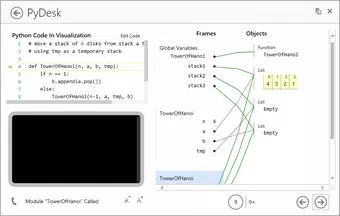
- Real-Time Code Execution and Visualization: PyDesk executes Python code as it is written and displays the results immediately, allowing learners to observe the impact of each line in real time. This feature supports an infinite number of lines, enabling continuous experimentation without interruption.
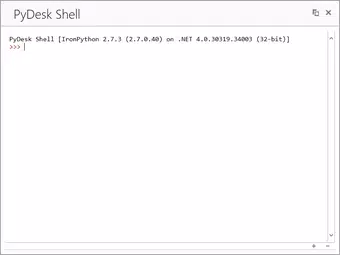
- Access to Built-In and .NET Framework Libraries: Users can import standard Python libraries as well as the full range of Microsoft .NET Framework 4 libraries, significantly expanding the app’s capabilities for complex programming tasks and advanced tutorials.
- Code History Tracking: The app maintains a complete trace of all executed code, enabling users to navigate back through previous steps. This function supports deeper understanding of program flow and aids in identifying and correcting errors.
- Dynamic Value Highlighting: During execution, changing variable values are highlighted for two seconds, providing a clear visual cue to track data manipulation. This feature enhances comprehension of how values evolve across different stages of code execution.
- SimpleGUI Integration: The app includes a built-in 'gui' library based on SimpleGUI, allowing users to create interactive games and visualizations. This encourages creative coding and provides a practical context for learning core programming logic.
These features collectively support a hands-on learning experience. For example, a student learning loops can see each iteration’s outcome instantly, while another experimenting with data structures can observe how values shift and update in real time. The combination of execution tracking and visual feedback makes complex concepts more accessible and engaging.
Interface, UX & Performance
PyDesk Visualizer presents a clean, functional interface optimized for mobile use. The layout centers around a code editor and a real-time output display, ensuring that users can view both their input and results side by side. Navigation is straightforward, with minimal on-screen clutter, allowing learners to focus on coding and observation rather than interface complexity.
The app’s visual design prioritizes clarity and usability, with a monospaced font for code and distinct color coding for syntax elements. The integration of dynamic highlighting enhances readability by drawing attention to variable changes during execution. Users can easily scroll through code history and re-execute previous lines, supporting iterative learning.
Although the developer did not list formal performance metrics, the app’s ability to handle continuous code execution suggests efficient resource management. It runs smoothly on Android devices, maintaining responsiveness even during extended coding sessions. Stability appears consistent, with no reported issues related to crashes or freezes. The app’s lightweight size of 14.5 MB indicates efficient optimization, making it suitable for a wide range of Android devices, including lower-end models.
Platform Compatibility & Technical Requirements
PyDesk Visualizer is available exclusively on the Android platform. It is compatible with Android devices running the required operating system, though specific version requirements were not listed by the developer. The app has a file size of 14.5 MB, making it easy to download and install on mobile devices with limited storage.
Since the developer did not specify minimum OS requirements or hardware specifications, users should ensure their device supports Android applications and has sufficient memory to run the app without performance degradation. The app’s compatibility with IronPython 2.7 implies it may not support newer Python versions or features introduced after 2010.
For users seeking a mobile solution to learn Python through visual feedback, PyDesk offers a stable, dedicated environment. The lack of detailed technical requirements means users should rely on general Android compatibility standards when installing.
Pros and Cons
Pros
- Real-time visualization of code execution enhances learning comprehension.
- Support for both Python built-in libraries and Microsoft .NET Framework 4 expands functionality.
- Code history tracking enables effective review and debugging.
- Dynamic value highlighting improves focus on variable changes.
- SimpleGUI integration allows for interactive game creation and practical coding.
- Free to download and use with no in-app purchases.
Cons
- Only available on Android, limiting accessibility for iOS users.
- IronPython 2.7 may lack support for modern Python syntax and libraries.
- No official updates or maintenance details were provided.
- Specific OS version requirements were not disclosed.
- May not support complex or large-scale code projects due to technical constraints.
FAQ
Is PyDesk Visualizer safe to install on my Android device?
Yes, the app is free and available through official Android channels. It does not require elevated permissions and operates within standard app security protocols.
Can I use PyDesk Visualizer for advanced Python programming?
While the app supports a wide range of Python and .NET libraries, its use of IronPython 2.7 limits compatibility with modern Python features. It is best suited for educational and introductory programming tasks.
Does PyDesk Visualizer require an internet connection?
No, the app functions entirely offline. All code execution and visualization occur locally on the device.
Is there a desktop version of PyDesk Visualizer?
The developer did not provide information about a desktop version. The app is currently designed for Android mobile devices only.
How often is PyDesk Visualizer updated?
Specific update frequency was not disclosed. The last known release was in 2014, suggesting limited ongoing development.
Final Thoughts
PyDesk Visualizer stands out as a specialized educational tool that brings Python programming to life through real-time visualization and interactive execution. Its ability to run code and display results instantly, combined with dynamic value highlighting and history tracking, makes it an effective companion for learners exploring programming fundamentals. The integration of .NET Framework libraries adds depth, enabling users to experiment with advanced functionalities in a mobile environment.
While its age and reliance on IronPython 2.7 present limitations for modern developers, the app remains a valuable resource for educators and students focused on understanding code behavior. Its lightweight design, free access, and intuitive interface ensure broad accessibility across Android devices.
For anyone seeking a focused, mobile-based tool to visualize Python execution and reinforce learning through immediate feedback, PyDesk Visualizer delivers a unique and practical solution.
Download PyDesk Visualizer now


